Create database access for a computer application using structured query language
114048

PURPOSE OF THE UNIT STANDARD
This unit standard is intended
- To provide advanced knowledge of the areas covered.
- For those working in, or entering the workplace in the area of Computer Operations.
People credited with this unit standard are able to
- Review requirements for database access for a computer application using SQL.
- Design database access for a computer application using SQL.
- Write program code for database access for a computer application using SQL.
- Test programs for a computer application that accesses a database using SQL.
- Document programs for a computer application that accesses a database using SQL.
LEARNING ASSUMED TO BE IN PLACE AND RECOGNITION OF PRIOR LEARNING
The credit value of this unit is based on a person having prior knowledge and skills to
- Demonstrate an understanding of fundamental mathematics (at least NQF level 3).
- Demonstrate PC competency skills (End-User Computing unit Standards, at least up to NQF level 4.)
- Demonstrate knowledge and skills to create a computer application using a 3GL.
SPECIFIC OUTCOME 1
Review the requirements for database access for a computer application using SQL.
A database is an organized collection of data that is stored and managed electronically. Businesses and organizations use databases to store, retrieve, and manipulate information efficiently.
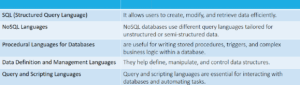
Database languages


SPECIFIC OUTCOME 2
Design database access for a computer application using SQL
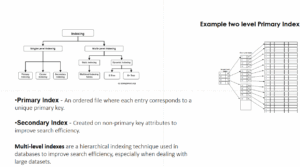
A simple index in databases is an indexing method that improves search efficiency by organizing data in a structured way.
Index Structures -Index structures are essential in databases to optimize data retrieval operations. They allow quick searching based on key values, reducing the need to scan entire datasets.
Types of index structures:

SPECIFIC OUTCOME 3
Write program code for database access for a computer application using SQL.
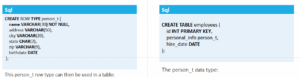
A named row type
is a structured data type in databases that groups multiple fields under a single name. It works similarly to a struct in programming languages like C or a class in object-oriented programming. Named row types allow for better organization and reuse of complex data structures.
Example of a named row type
User-defined types (UDTs)
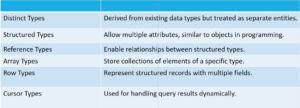
User-defined types (UDTs) are custom data types created by users to extend the built-in types available in a system. They allow for better data organization, encapsulation, and reusability in databases and programming languages.
Types of User-defined types (UDTs)
User-Defined Routines
User-defined routines (UDRs) are custom procedures, functions, or methods created by users to extend the functionality of a database system. They allow developers to encapsulate logic that isn’t provided by built-in routines, making applications more flexible and efficient.
Types of User-Defined Routines
- User-Defined Functions (UDFs): Custom functions that return values based on input parameters.
- User-Defined Procedures (UDPs): Encapsulated logic that performs operations but does not return a value.
- User-Defined Methods: Functions associated with user-defined types (UDTs) to manipulate structured data.
SPECIFIC OUTCOME 4
Test programs for a computer application that accesses a database using SQL.
Debugging is the process of identifying, analyzing, and fixing errors (bugs) in software.
Typical debugging process
- Reproduce the Bug – Ensure the issue can be consistently triggered.
- Locate the Bug – Identify the exact part of the code causing the problem.
- Analyze the Root Cause – Understand why the bug occurs.
- Fix the Bug – Modify the code to resolve the issue.
- Test the Fix – Run unit, integration, and regression tests to confirm the solution.
- Document the Process – Record the issue, solution, and any insights for future reference.
SPECIFIC OUTCOME 5
Document programs for a computer application that accesses a database using SQL.
The documents associated with a software project and the system being developed have a number of associated requirements
- They should act as a communication medium between members of the development team.
- They should be a system information repository to be used by maintenance engineers.
- They should provide information for management to help them plan, budget and schedule the software development process.
- Some of the documents should tell users how to use and administer the system.

