114053
SPECIFIC OUTCOME 1.
Monitor the performance of a multi-user networked operating system
- The monitoring explains system performance measures, and outlines and justifies a monitoring strategy.
- The monitoring is carried out in accordance with the monitoring strategy.
- The monitoring compares the results produced from performance monitoring, with user perception of performance, and identifies discrepancies between the two measures.
- The monitoring identifies performance-limiting factors.
- The monitoring outlines recommendations to improve performance, and justifies them using performance analysis.
|
1.1 Monitor the performance of a multi-user networked operating system A multi-user operating system is a computer operating system (OS) that allows multiple users on different computers or terminals to access a single system with one OS on it. These programs are often quite complicated and must be able to properly manage the necessary tasks required by the different users connected to it. The users will typically be at terminals or computers that give them access to the system through a network, as well as other machines on the system such as printers. A multi-user operating system differs from a single-user system on a network in that each user is accessing the same OS at different machines. The operating system on a computer is one of the most important programs used. It is typically responsible for managing memory and processing for other applications and programs being run, as well as recognizing and using hardware connected to the system, and properly handling user interaction and data requests. On a system using a multi-user operating system this can be even more important, since multiple people require the system to be functioning properly simultaneously. This type of system is often used on mainframes and similar machines, and if the system fails it can affect dozens or even hundreds of people. A multi-user operating system allows multiple users to access the data and processes of a single machine from different computers or terminals. These were previously often connected to the larger system through a wired network, though now wireless networking for this type of system is more common. A multi-user operating system is often used in businesses and offices where different users need to access the same resources, but these resources cannot be installed on every system. In a multi-user operating system, the OS must be able to handle the various needs and requests of all of the users effectively. This means keeping the usage of resources appropriate for each user and keeping these resource allocations separate. By doing this, the multi-user operating system is able to better ensure that each user does not hinder the efforts of another, and that if the system fails or has an error for one user, it might not affect all of the other users. This makes a multi-user operating system typically quite a bit more complicated than a single-user system that only needs to handle the requests and operations of one person. In a multi-user system, for example, the OS may need to handle numerous people attempting to use a single printer simultaneously. The system processes the requests and places the print jobs in a queue that keeps them organized and allows each job to print out one at a time. Without a multi-user OS, the jobs could become intermingled and the resulting printed pages would be virtually incomprehensible.
Multi-user operating systems and the need to know. |
|
We all now know that Operating Systems are the back bones of computers. Multi-user operating systems allow multiple users to use the resources on a single computer simultaneously or at different times. Linux, UNIX and Windows 2000 are few examples of multi user operating systems. When using a multi user operating system, there are a few things you may need to know to make maximum use of its features even without the help of a technical assistant at home or office. Let’s take for an example a user of a UNIX multi user operating system. As intended, many users will all be sharing the same resources in a machine. Occasionally you may need to find out some very basic information like, whether the co-worker is logged on? Has a co-worker read the email you sent? How to find out if the co-worker has come to work if he never logs out? You can find out lots of basic data like the above and more about users and the system easily and without any special permission. When you need to find out whether someone is at office or at a meeting or on leave what do you do? Some co-workers make it easy by setting their email and voice mail so anyone who tries to contact them will be sent the information automatically. But some leave you guessing more often than not. In UNIX there are many commands to assist you. For example, if you want to find out who is currently logged in to the system and even the time they had logged in you can use the ‘who’ command. On systems with many users, the ‘who’ command will output more data than can be processed. In these cases, the ‘who’ command can be used with the ‘more’ or ‘grep’ command to output specific information. To find out what the other users are working on in their personal computers (PCs), you can use the ‘ps’ command. This will show you all the processes running on the system and will help you find out who is doing what. There is also a command called the ‘finger command’. This is useful to find out who is logged in and how long a co-worker is idle. It can also show you when the other person last read his/her email. It will also show you what the other person is working on at that moment and the login name of the other person. These are some basic things a user working on a multi user operating system needs to be aware of, as one cannot depend on a technical person always to be on hand when you may require important information urgently. In fact multi user operating systems are especially user friendly as there is no other system that would involve many users at the same time. |
Importance of Statistics
Before reacting to a problem, collect all possible statistics and get an overall picture of the application. Getting a complete landscape of the system may take considerable effort. But, if data has already been collected and embedded into the application, then this process is much easier.
After collecting as much initial data as possible, outline issues found from the statistics, the same way doctors collect symptoms from patients. Reacting to symptoms too early in the performance analysis process generally results in an incorrect analysis, which wastes time later. For example, it is extremely risky for a doctor to prescribe open heart surgery for a patient who complains of chest pains on the initial consultation.
Operating System Statistics
Operating system statistics provide information on the usage and performance of the main hardware components of the system, as well as the performance of the operating system itself. This information is crucial for detecting potential resource exhaustion, such as CPU cycles and physical memory, and for detecting bad performance of peripherals, such as disk drives.
Operating system statistics are only an indication of how the hardware and operating system are working. Many system performance analysts react to a hardware resource shortage by installing more hardware. This is a reactionary response to a series of symptoms shown in the operating system statistics. It is always best to consider operating system statistics as a diagnostic tool, similar to the way many doctors use body temperature, pulse rate, and patient pain when making a diagnosis. To help identify bottlenecks, gather operating system statistics for all servers in the system under performance analysis.
Importance of Historical Data and Baselines
One of the biggest challenges for performance engineers is determining what changed in the system to cause a satisfactory application to start having performance problems. The list of possibilities on a modern complex system is extensive.
Historical performance data is crucial in eliminating as many variables as possible. This means that you should collect operating system, database, and application statistics from the first day an application is rolled out into production. This applies even if the performance is unsatisfactory. As the applications stabilize and the performance characteristics are better understood, a set of statistics becomes the baseline for future reference. These statistics can be used to correlate against a day when performance is not satisfactory. They are also essential for future capacity and growth planning.
SPECIFIC OUTCOME 2.
Resolve problems with a multi-user networked operating system.
- The resolution ensures that the operating system is returned to service, free of problem symptoms.
- The resolution uses an industry recommended procedure to diagnose problems.
- The resolution ensures that descriptions of solutions to the problems are justified by diagnostic evidence.
- The resolution uses a diagnostic tool to diagnose problems.
- The resolution ensures that the problem causes and resolutions are documented according to industry recommended practice.
2.1 Resolve problems with a multi-user networked operating system
How to Check the Operating System
The following list should be considered when checking operating system symptoms.
- Check CPU utilization in user and kernel space for the total system and on each CPU.
- Confirm that there is no paging or swapping.
- Check that network latencies between machines are acceptable.
- Find disks with poor response times or long queues.
- Confirm that there are no hardware errors.
A Sample Decision Process for Performance Conceptual Modeling
Conceptual modeling is almost deterministic. However, as your performance tuning experience increases, you will appreciate that there are no real rules to follow. A flexible “heads up” approach is required to interpret the various statistics and make good decisions.
This section illustrates how a performance engineer might look for bottlenecks. Use this only as a guideline for the process. With experience, performance engineers add to the steps involved. This analysis assumes that statistics for both the operating system and the database have been gathered.
- Is the response time/batch run time acceptable for a single user on an empty or lightly loaded machine?
If it is not acceptable, then the application is probably not coded or designed optimally, and it will never be acceptable in a multiple user situation when system resources are shared. In this case, get application internal statistics, and get SQL Trace and SQL plan information. Work with developers to investigate problems in data, index, transaction SQL design, and potential deferral of work to batch/background processing.
- Is all the CPU being utilized?
If the kernel utilization is over 40%, then investigate the operating system for network transfers, paging, swapping, or process thrashing. Otherwise, move onto CPU utilization in user space. Check to see if there are any non-database jobs consuming CPU on the machine limiting the amount of shared CPU resources, such as backups, file transforms, print queues, and so on. After determining that the database is using most of the CPU, investigate the top SQL by CPU utilization. These statements form the basis of all future analysis. Check the SQL and the transactions submitting the SQL for optimal execution. In Oracle Server releases prior to 9i, use buffer gets as the measure for CPU usage. With release 9i, Oracle provides the actual CPU statistics in V$SQL.
If the application is optimal and there are no inefficiencies in the SQL execution, consider rescheduling some work to off-peak hours or using a bigger machine.
- At this point, the system performance is unsatisfactory, yet the CPU resources are not fully utilized.
In this case, you have serialization and unscalable behavior within the server. Get the WAIT_EVENTS statistics from the server, and determine the biggest serialization point. If there are no serialization points, then the problem is most likely outside the database, and this should be the focus of investigation. Elimination of WAIT_EVENTS involves modifying application SQL and tuning database parameters. This process is very iterative and requires the ability to drill down on the WAIT_EVENTS systematically to eliminate serialization points.
SPECIFIC OUTCOME 3.
Maintain a multi-user networked operating system.
3.1 Maintain a multi-user networked operating system
Software Installation and Maintenance Overview
Administrator Benefits
By using Software Installation and Maintenance, administrators can ensure that users have the software they need for their jobs, without requiring the administrator or technical support personnel to visit each computer to install it. Administrators can centrally manage:
- Initial deployment of software, including productivity applications, in-house or Line of Business (LOB) applications, and operating system service packs.
- Upgrades of existing software to a new version or replacement software, including Windows 2000 operating system upgrades.
Administrators can deploy software as either assigned or published. Assigned software is deployed to all users who must have the software to perform their jobs. Software can also be assigned to computers. Published software is made available to users who might want to use the software, allowing users to decide whether to install it. For more information on assigning and publishing software, see the section “The Targeting Phase.”
Organizational Benefits
With Software Installation and Maintenance, administrators can ensure that the software users require to perform their jobs is always available. Administrators can customize how software is deployed; for example, they can deploy only the software that users require, or they can deploy just the features of the software users require. Because Software Installation and Maintenance utilizes Active Directory, Group Policy, and Windows Installer, additional benefits are provided. For example, if a user inadvertently deletes an assigned application, it will continue to be available. If users roam from one computer to another, their assigned software is always available for them to use. Administrators use Group Policy to control what software users can install and from which media. For instance, administrators can set a policy that prevents users from installing software from local media such as a CD-ROM or diskette. By leveraging Windows Installer, Software Installation and Maintenance allows the administrator to limit the security level of users – users do not have to be administrators of their Windows 2000 Professional computer to install software. This means that users are only granted the appropriate level of permissions (and no more) for them to do their job.
End User Benefits
Users benefit by having access to their required software, and because of the reliability and resilience provided by Windows Installer, users have an easier and more consistent experience. Users can get the software they require from the Add/Remove Programs in the Control Panel. They can also manage the software on their computer from this location, including installing, repairing, modifying, or removing it. Software Installation and Maintenance addresses another end-user scenario. Users frequently receive documents by e-mail attachment. If the software associated with the document is not installed on the user’s computer, when they try to open this document, they are presented with the Open with dialog box, and they have to determine which of their currently installed software programs might be able to open the document. In Windows 2000, when the user double-clicks on the attachment, Software Installation and Maintenance installs the software that the administrator specified should be used to open and edit the document, and then Windows 2000 opens it.
Security Assessment
The first question to ask is what needs to be done to provide appropriate security for the agency’s network? The total network is only as secure as its weakest link, and, as mentioned, most security breaches occur from people who work inside the agency itself. For this reason, the implementation of very simple security measures, many of which are free or are inexpensive, can provide significant protection for the total network. The first step is to perform a security assessment. If multiple agencies are connected to a larger intranet (a private network that provides users access within the agency and to the public Internet), the security assessment is ideally performed collaboratively. Common security strategies should be employed throughout this intranet and for all components of the network. In performing a security assessment, the agency should address each of the topics discussed in this chapter. In assessing the level of security, agency staff should
- identify each point of potential failure in the system and assess how each failure would affect the agency;
- prioritize the points at greatest risk or those that would cause the biggest problems for the agency; and
- ascertain one or more solutions to secure those points and determine the costs associated with each solution.
A security plan should be written under the auspices of the district technology director, but should involve other agency representatives. When developing the plan, the agency should consider the following issues:
- The plan should be drafted for adoption by the governing body.
- The plan should take into consideration the information gained during the assessment phase.
- System users should be educated about the plan and its importance to the agency.
- System users should be consistently informed of changes to security procedures.
- The agency should regularly appraise security protocol and should revise or update the plan as needed.
Securing Hardware
Hardware security includes the physical protection of equipment (e.g., computers, printers, monitors, etc.) from both theft and damage. Different types of hardware require different types of protection. Servers and related equipment should be placed in a secure room with limited access. The room should have proper environmental conditioning and fire protection equipment.* (i.e., fire extinguishing systems should be used in areas where water cannot be used). While this may seem obvious, an asset (inventory) control system will assist with the agency’s technology planning efforts. Without an asset control system, the agency will be unable to determine what hardware exists or where it is. This system is also important so that the agency can determine which computers, or other systems, need to be replaced as they become obsolete. Along with the obvious fact that proper security deters theft of property, effective hardware security bars unauthorized access to the server. Proper security prevents people from tampering with server settings, corrupting data, or gaining access to unauthorized programs and confidential information. Measures for securing hardware systems include the following:
- allocate dedicated building space to house centralized hardware;
- maintain controlled entry (e.g., card, key, combination lock access);
- make certain that a proper fire protection system exists;
- maintain proper temperature and humidity controls;
- evaluate the need for adequate electrical power, including power for air conditioning;
- provide emergency sources of power (e.g., UPS battery backup, alternative electrical generator);
- arrange equipment placement within equipment racks and on the floor in a way that allows adequate ventilation;
- monitor the room environment and electrical systems; and
- use network monitoring and packet-sniffing(see below) utilities that display and log data traffic to detect the installation of unauthorized hardware and/or software applications (i.e., monitor for protocol violations, bandwidth-intensive applications, etc.).
Securing Operating Systems
The operating system (OS) is the underlying computer system on which application programs run. Choosing an OS is a critical decision that directly affects the security measures an agency must take. Some OSs are easy to use but less secure. Others are more complicated to maintain but when properly configured are virtually impenetrable. Whatever the choice, the system must be “hardened,” or secured, by removing unneeded functions, restricting access, and tracking changes and processes.
If, for example, a port (i.e., a doorway into a system) is left open unintentionally, it can become the door through which an intruder can enter the network. Conversely, if the system is secure, intruders will have a much more difficult time entering the system.
Many OS options are available, from “UNIX-like” freeware (public domain software offered at no cost) to various Microsoft and Apple products, which vary in acquisition and maintenance costs. Acquisition cost does not necessarily indicate the power of any particular OS. The agency should ensure that the hardware and OS combination is robust enough for the intended purpose. The OS must have the ability to be configured to meet both the service and security requirements of the agency. The criteria for the OS selection should be based on the agency’s needs assessment. The agency should take into account the resources necessary to support the OS. If the agency chooses to run a mixed environment (a combination of hardware and software utilizing more than one OS), it should be sure the support resources required to maintain this configuration are available. A mixed computing environment requires additional expertise and resources in order to maintain proper security. OS security consists of limiting access to network resources, such as centralized applications, files and directories, network printers, and other such components. Personnel should have network access only for the specific tasks related to their work. An appropriate policy for OS security is a baseline denial of access to all components by all personnel, with explicit access privileges granted on a case-by-case basis. User login credentials identifying the role(s) and profile of the user should “describe” the user’s access parameters to the OS. The extent of access to network resources granted to the user should be based on the individual’s authorized role/profile. Different operating systems regulate user access in different ways; however, each provides similar functionality by assigning Read, Write, and Execute permissions on directories, files, network printers, etc., to groups of users or individual users as required. Some access-related security measures that should be implemented are as follows:
- disable guest accounts;
- change default passwords;
- force frequent user password changes;
- allow only no dictionary passwords, that is, a combination of alpha and numeric characters;
- deny access by default;
- restrict off-hour access unless the user requires 24/7 access;
- for ease of administration, control access based on groups, profiles, and policies;
- assign users into the smallest possible groups to eliminate unneeded access;
- designate a system administrator backup to adequately cover leave times;
- require administrator access through a different login mechanism, notthrough the normal user login;
- allow only needed services to run on the network (e.g., Telnet, web, RSH, FTP, NTP, etc.);
- allow only authorized administrators to install software;
- allow only needed protocols to run on the network (e.g., IPX/SPX, Appletalk, NetBEUI, TCP/IP, DLC, SNMP, etc.);
- integrate TACACS+ or RADIUS authentication into the agency’s firewall to avoid unauthorized Internet access; and
- enable firewall, virus, intruder detection, and network monitoring software (see below).
Securing Software (Applications)
As noted earlier, software programs are applications that run “on top” of the operating system. The most common applications are information systems, word processors, spread sheets, e-mail programs, and web browsers. There are literally thousands of applications available. The purpose of this section is to provide education agencies with recommendations for securing software applications. Security in this area will limit (not eliminate) copyright infringements, assist in the proper licensing of software, and attempt to ensure that only authorized persons have access to software installation media. Software installation media should be stored in a centralized location with proper documentation of the number of licenses and number of installations. These media should be protected from harsh environmental conditions, such as excessive heat, moisture, and electrical and magnetic fields (EMF). All software media should be backed up regularly to ensure that no data are lost. Periodic backups stored in a secure off-site location will make it possible to recover quickly from a catastrophe on site. The agency should take into account regional peculiarities when storing backups off site. For example, in areas prone to earthquakes, media should not be stored in high-rise buildings; in areas prone to flooding, media should be stored in a facility away from the flood plain.
Some recommendations for software security are as follows:
- store software media in a locked cabinet within a proper environment;
- retain off-site storage for backups of installation media;
- test the process for restoring software;
- retain off-site storage of licensing and application documentation;
- maintain and back up licensing management and related documentation;
- allow access to applications through the use of network security settings to only those groups/users that require access;
- implement a software-auditing package to ensure license compliance and to ensure that no unauthorized software has been installed on the agency’s system;
- standardize applications across the agency;
- use virus-scanning software with frequent definition updates (network-attached appliances are available for e-mail virus scanning); and
- use spamming prevention or filtering software to prevent unauthorized entry of email (e.g., do not allow web-based e-mail programs, such as Hotmail?). Unauthorized e-mail entry is a serious vulnerability that can lead to the entry of viruses into the network through a “back door.”
Securing the Network
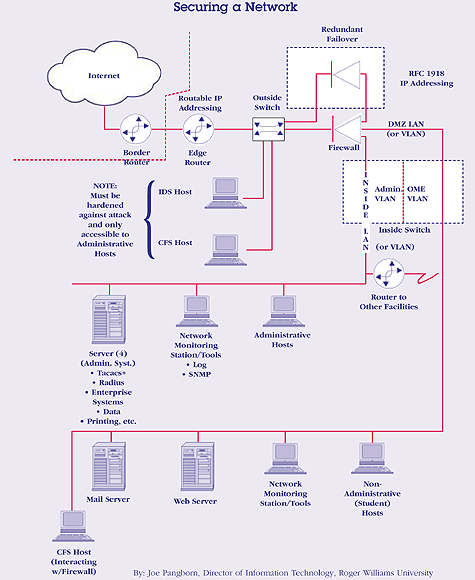
The same security procedures in place for server hardware apply to equipment that supports the network, including switches, hubs, routers, firewalls, access points, cabling, etc. Network equipment should be installed in an environment with proper ventilation and power requirements and should be protected from unauthorized access. The agency should place the equipment in dedicated building spaces. Access should be limited to staff that have a key, combination lock, key card, or other security device. Some basic precautions for securing network equipment are as follows:
- limit access to network equipment to authorized individuals;
- do not allow users to install unauthorized network equipment;
- use secure, encrypted passwords for “root” access (access to the “root” enables users to control entire systems or servers); and
- ensure proper cabling and cable protection by
- running cabling under a false floor,
- avoiding running cable over fluorescent lighting fixtures, and
- staying within cable/fiber length requirements.
A fundamental action the agency can take toward maintaining a secure and reliable network is to hire a qualified individual to serve as the network administrator. Network administration is not a task for the average high school teacher/technology coordinator. Many agencies, however, cannot afford to hire an experienced network administrator for each school and often do rely on faculty for this position. If a teacher/coordinator is to be responsible for a school network, the agency must recognize training and professional development as priorities.
Agency network policies and procedures should be clearly defined. These policies should be made readily available to anyone responsible for maintaining the network. Listed below are some items to consider for agencies managing their own networks. The responsibilities of a network administrator are, for the most part, very technical in nature. This reinforces the point that training is critical for anyone with the responsibility of running a network. Agencies should
- assign one individual to be responsible for network administration (and one individual as his/her backup);
- limit access to network equipment console screens by login credentials (either on the piece of network equipment or using an authentication server);
- limit access to Telnet sessions on network equipment through access lists and/or authorized workstations where only authorized users have access;
- limit protocols running on the network equipment;
- configure login banners to warn intruders of possible prosecution;
- use firewalls to prevent unauthorized access between external and internal systems;
- use unroutable IP addressing schemes within the internal network [Class A – 10.0.0.0-10.255.255.255 (10/8 prefix), Class B – 172.16.0.0-172.31.255.255 (172.16/12 prefix), Class C – 192.168.0.0-192.168.255.255 (192.168/16 prefix)];
- utilize intrusion detection systems (IDS);
- inspect, analyze, and maintain router audit logs;
- provide ingress and egress access control list (ACL) filtering to prevent IP spoofing; and
- eliminate unauthorized network resource use by
- monitoring network traffic and bandwidth usage and protocols to ensure adequate bandwidth for applications;
- removing the ability to download unauthorized files;
- restricting remote access to network resources to authorized individuals with types of remote access including dial-up connections, virtual private networks (VPN), and Point-to-Point Protocol (PPP);
- implementing a multiple-authentication policy for authorized users or integrating into an authentication server;
- eliminating any “back-door” types of equipment (e.g., user modems installed on desktops);
- maintaining proper encryption of remote connections to ensure confidentiality; and
- using VPN technology with proper encryption to gain connectivity through the public networks such as the Internet.
Wireless Networks
Wireless communication is a rapidly evolving technology that is becoming increasingly prevalent in everyday life. The built-in security for wireless computer networks, however, is relatively weak. Technology coordinators need to pay particular attention to secure these networks properly, and the network administrator must keep up to date on emerging methods for securing wireless networks. Some security measures to consider when planning a wireless network are as follows:
- shut off Service Set Identifier (SSID) broadcasting and use an SSID that does not identify the agency by name;
- select a hardware vendor and software revision that has fixed the problem of randomization of initialization vectors (IVs);
- utilize applications like AirSnort or BSD-AirTools, which will be less likely to crack the agency’s Wired Equivalent Privacy (WEP) keys;
- use 128-bit WEP and change WEP keys regularly. Select a vendor that provides a tool to rotate the agency’s WEP keys;
- disallow access to resources at the first router hop other than the agency’s VPN server, which ensures that the only host available to the wireless segment is the VPN server until a tunnel is established;
- place wireless access points on a dedicated virtual local area network (VLAN). Do notmix wired and wireless clients on the same LAN segment;
- implement a policy that limits the amount of connectivity a wireless client has to the agency’s network. Assess whether students/faculty/staff need more access than TCP/80, TCP/443, etc.;
- utilize personal firewalls on the agency’s workstations; and
- disable automatic IP address assignment (DCHP).
If hackers are able to guess or crack the agency’s WEP keys, they will not be able to access the remainder of the internal network because VPN and VLAN architecture with access lists will allow only authorized VPN clients to be routed to the network from a wireless VLAN segment. Hackers will be able to attack clients on the same subnet, however, and if one VPN connection is left up, it could be abused to access the rest of the internal network.
Network Reliability
Reliability of the network is a key to daily business operations and to an effective instructional program. Everyone in the school hears about the times a teacher has scheduled a web-dependent lesson only to be unable to access the network. It is imperative that “mission-critical” applications (e.g., financial systems, student information systems) always be available to those who depend on the systems.
Network architecture designed for redundancy, with built-in backups for primary resources, minimizes the incidence of network downtime. When considering this issue, the agency should take into account the extent of redundancy needed.
Where it is possible, consider redundancy in both LAN and wide area network (WAN) architectures during the design phase. The agency should select redundant service providers that use separate infrastructures. Some specific redundancies that can be built into the network apply to
- the local loop for WAN connectivity;
- switch management modules with redundant connections;
- power sources for network equipment backed up by monitored UPS systems;
- power supplies in network equipment;
- network management (supervisor) modules in network equipment;
- cabling, as required; and
- redundant cabling in redundant conduits, ducts, or poles. Having a second cable running through the same conduit as the first provides little protection. For example, a conduit could be dug up by an “uncaring” backhoe destroying both primary and redundant cables.
Another measure to maximize network reliability is the implementation of intrusion detection systems. Intrusion detection systems are host-based or network-based software that monitors attempts to break into and gain access to the network. These systems watch data packets as they transit the network outside the firewall. They monitor attempted port scans, distributed denial of service (DoS) attacks, and other intrusion attempts. Intrusion detection protocol should include the following tasks:
- install and configure an intrusion detection system;
- enable port monitoring outside the agency’s firewall;
- review intrusion detection system log files daily;
- configure blocking on the router (e.g., “black hole routing” of unwanted data) to head off severe hacking attempts; and
- contact the organization that owns the address of the attacking IP address. Tools such as nslookup, tracerroute,or the following web sites can help identify the owners of the IP address space from which an attack originated:
Data Security
Data drive the engine of each educational organization. From payroll records to “datadriven decisions” about instructional programs to student information systems, human resources files, transportation information, and student portfolios-data integrity is critical. Keeping data secure is the primary mission of those in charge of technology. Protecting the agency’s data by implementing robust architectures and comprehensive backup and recovery plans is extremely important. The agency must take every precaution to prevent unauthorized users from changing data, deliberately or inadvertently, by way of a “hole” in security procedures. Security holes can occur from outside through the web or internally from within the LAN. The following recommendations for maintaining data security are based on using Redundant Array of Independent Disks (RAID). This allows the same data to be stored in different places on multiple hard drives. When using RAID, the following steps should be taken:
- Data files should be stored on separate logical drives consisting of a RAID-5 (stripped set) array of physical devices.
- Transaction logs should be stored on, at least, a RAID-1 array (mirrored).
- Applications should be installed on either a mirror set (RAID-1) or stripped set (RAID-5) and should be backed up when installed, changed, or updated.
- Operating systems (OS) should be installed on, at least, a RAID-1 array and be backed up when they are changed.
- OS, applications, and data should be stored on separate physical and logical drives (e.g., mirror set 0 to contain the system, mirror or stripped set 1 to contain applications, stripped set 2 to contain data).
- Consistent backups of data off site should be maintained.
- Robust network-attached storage (RAID-5) or storage area networks to maintain online or backup data should be used.
- Clustered server architecture should be considered if the information stored is “mission critical.
Backing up Data
The reasons for backing up data are obvious. However, many agencies (both inside and outside the education community) do not take this task seriously until they lose data. When the payroll information cannot be found or when all the student information entered into the system during the day is lost, people will pay attention to backing up data. It is better to pay attention before a disaster strikes.
