114075
SPECIFIC OUTCOME 1.
Review user requirements for a local area computer network.
- The review identifies and explains the feasibility of the requirements.
- The review identifies user objectives and critical performance factors.
- The review estimates the resources required so that the cost may be estimated.
- The review adopts a review procedure which ensures that the final outcome meets user requirements.
1.1 Review user requirements for a local area computer network
Views of networks
Users and network administrators typically have different views of their networks. Users can share printers and some servers from a workgroup, which usually means they are in the same geographic location and are on the same LAN, whereas a Network Administrator is responsible to keep that network up and running. A community of interest has less of a connection of being in a local area, and should be thought of as a set of arbitrarily located users who share a set of servers, and possibly also communicate via peer-to-peer technologies.
Network administrators can see networks from both physical and logical perspectives. The physical perspective involves geographic locations, physical cabling, and the network elements (e.g., routers, bridges and application layer gateways) that interconnect via the transmission media. Logical networks, called, in the TCP/IP architecture, subnets, map onto one or more transmission media. For example, a common practice in a campus of buildings is to make a set of LAN cables in each building appear to be a common subnet, using virtual LAN (VLAN) technology.
Both users and administrators are aware, to varying extents, of the trust and scope characteristics of a network. Again using TCP/IP architectural terminology, an intranet is a community of interest under private administration usually by an enterprise, and is only accessible by authorized users (e.g. employees). Intranets do not have to be connected to the Internet, but generally have a limited connection. An extranet is an extension of an intranet that allows secure communications to users outside of the intranet (e.g. business partners, customers).[
Unofficially, the Internet is the set of users, enterprises, and content providers that are interconnected by Internet Service Providers (ISP). From an engineering viewpoint, the Internet is the set of subnets, and aggregates of subnets, which share the registered IP address space and exchange information about the reachability of those IP addresses using the Border Gateway Protocol. Typically, the human-readable names of servers are translated to IP addresses, transparently to users, via the directory function of the Domain Name System (DNS).
Over the Internet, there can be business-to-business (B2B), business-to-consumer (B2C) and consumer-to-consumer (C2C) communications. When money or sensitive information is exchanged, the communications are apt to be protected by some form of communications security mechanism. Intranets and extranets can be securely superimposed onto the Internet, without any access by general Internet users and administrators, using secure Virtual Private Network (VPN) technology.
PURCHASING A LAN
When purchasing a LAN, or even investigating the possibility of installing one, several considerations must be kept in mind. The costs involved and the administrative support needed often far exceed reasonable predictions. Three general concerns when considering a LAN include administration, security, and productivity. Administration utilities regulate and coordinate file, application, peripheral, and resource use, while security utilities control access to the network. Productivity refers to the tasks a company wants to perform via a LAN, which may include file, database, and printer sharing. Moreover, thorough consideration of potential costs should include such factors as purchase price of equipment, spare parts and taxes, installation costs, labor and building modifications, and permits. Operating costs include forecasted public network traffic, diagnostics, and routine maintenance. In addition, the buyer should seek a schedule of potential costs associated with upgrades and expansion of the network, since company LANs tend to require new technology and to expand periodically.
The vendor should agree to a contract expressly detailing the degree of support that will be provided in installing and turning on the system. In addition, the vendor should provide a maintenance contract that binds the company to make immediate, free repairs when performance of the system exceeds prescribed standards. All of these factors should be addressed in the buyer’s request for proposal, which is distributed to potential vendors.
THREATS TO LAN SECURITY
A threat is an identifiable risk that has some probability of occurring. People threats are by far the largest category and most of the people are insiders – employees who make errors and omissions, and employees who are disgruntled or dishonest.
People threats are costly. Employee errors, accidents, and omissions cause some 50 to 60 percent of the annual dollar losses. Disgruntled employees and dishonest employees add another 20 percent. These insider threats are estimated to account for over 75 percent of the annual dollar loss experienced by organizations each year. Outsider threats such as hackers and viruses add another 5 percent. Physical threats, mainly fire and water damage, add another 20 percent. It should be noted that these figures were published in 1988, and since that time there has been a dramatic increase in virus incidents, which may significantly enlarge the dollar loss from outsider threats, particularly in the LAN environment.
In this paper, threats are grouped in three broad areas: People threats, virus threats, and physical threats. LANs are particularly
susceptible to people and virus related threats because of the large number of people who have access rights.
People Threats
People threats include the following:
System Administration Error: all human errors occurring in the setup, administration, and operation of LAN systems, ranging from the failure to properly enable access controls and other security features to the lack of adequate backups. The possible consequences include loss of data confidentiality, integrity, and system availability, as well as possible embarrassment to the government or the individual. PC Operator Error: all human errors occurring in the operation of PC/LAN systems, including improper use of logon/passwords, inadvertent deletion of files, and inadequate backups. Possible consequences include data privacy violations and loss of capabilities (such as the accidental erasure of critical programs or data).
Software/Programming Error: all the “bugs,” incompatibility issues, and related problems that occur in developing, installing, and maintaining software on a LAN. Possible consequences include degradation, interruption, or loss of LAN capabilities.
Unauthorized Disclosure: any release of sensitive information on the LAN that is not sanctioned by proper authority, including those caused by carelessness and accidental release. Possible consequences are violations of law and policy, abridgement of rights of individuals, embarrassment to individuals and the government, and loss of public confidence in government.
Unauthorized Use: employment of government resources for purposes not authorized by the Agency and the use of non-government
Fraud/Embezzlement: the unlawful deletion of government recorded assets through the deceitful manipulation of government controls, files and data, often through the use of a LAN. Possible consequences include monetary loss and wrongful contract/grant awards.
Modification of Data: any unauthorized changing of data, which can be motivated by such things as personal gain, favoritism, a misguided sense of duty, or a malicious intent to sabotage. Possible consequences include the loss of data integrity and potentially flawed decision making. A high risk is the disgruntled employee.
Alteration of Software: any unauthorized changing of software, which can be motivated by such things as disgruntlement, personal gain, or a misguided sense of duty. Possible consequences include all kinds of processing errors and loss of quality in output products.
Theft of ADP Assets: the unauthorized/unlawful removal of data, hardware, or software from government facilities. Possible consequences for the loss of hardware can include the loss of important data and programs resident on the hard disk or on diskettes stored in the immediate vicinity.
METHOD OF ANALYSIS
Formal versus Informal
An informal security review can be used for systems with Level 1 security designations. Formal risk assessments are required for Level 2 and 3, in accordance with the DHHS AISSP Handbook. See Section 4 below for further discussion of levels of protection.
Automated Risk Assessment
There are a considerable number of automated risk assessment packages, of varying capabilities and costs, available in the market place. These automated packages address large and medium facilities, applications, office automation, and even LANs to some extent. Regrettably, there appears to be no automated package that adequately addresses LANs. Several packages contain general analyses of network vulnerabilities applicable in part to LANs, and many PC assessment protocols include questions relating to LAN attachments. However, to date no package has been found to have adequate coverage of LAN administration, protection of file servers, and PC/LAN backup practices and procedures.
Questionnaires and Checklists
The key to good security management is measurement – knowing where one is in relation to what needs to be done.
Questionnaires are one way to gather relevant information from the user community. A PC/LAN. Questionnaire can be a simple, quick, and effective tool to support informal and formal risk assessments. For small, informal risk assessments, the PC/LAN Questionnaire can be the main assessment tool. A checklist is another valuable tool for helping to evaluate the status of security. A customized, DHHS version of an automated questionnaire and assessment package is being made available to the Department. Associates, prompts the user to respond to a series of PC and LAN questions, which are tailored on-line to the user’s environment, and then provides recommendations to improve the user’s security practices and safeguards. Designed for the average PC user, the product functions as a risk assessment tool. A questionnaire/checklist may be a useful first step in determining if a more formal/extensive risk assessment needs to be done, as well as to guide
SPECIFIC OUTCOME 2.
Prepare a design for a local area computer network.
- The preparation ensures that the design fulfills user requirements.
- The preparation ensures that the LAN topology makes efficient use of network resources.
- The preparation ensures that the design meets the computer network equipment manufacturer`s requirements and the support provider`s requirements.
2.1 Prepare a design for a local area computer network
TOPOLOGIES
LANs are designed in several different topologies or physical patterns of connecting terminals. The most common topology is the bus, where several terminals are connected directly to each other over a single transmission path. Its layout is linear and it resembles a street with several driveways. The bus network requires cables that allow signals to flow in either direction, called a full duplex medium. Each terminal on the bus LAN contends with other terminals for access to the system. When it has secured access to the system, it broadcasts its message to all the terminals at once. The message is picked up by the one terminal or group of terminal stations for which it is intended. The bus network’s lack of routing and central control make it very reliable, because failure of one of the network’s computers generally will not impede the flow of other network traffic.
A second topology, the star network, also works like a bus in terms of contention and broadcast. But in the star, stations are connected to a single, central node that administers access. The central node knows the path to all the other nodes, which makes routing easy. The central node also enables access control and establishing a priority status for users. Several of these nodes may be connected to one another. For example, a bus serving 6 stations may be connected to another bus serving 10 stations and a third bus connecting 12 stations. The star topology is most often used where the connecting facilities are coaxial or twisted wire pair. The ring topology connects each station to its own node, and these nodes are connected in a circular fashion. Node I is connected to node 2, which is connected to node 3, and so on, and the final node is connected back to node 1. Messages sent over the LAN are regenerated by each node, but retained only by the addressees. Eventually, the message circulates back to the sending node, which removes it from the stream. Consequently, this configuration does not require routing.
How to Create a Local Area Network (LAN)
A LAN, or local area network, is a great way to share files and devices between multiple computers. If you have several computers in your home, setting up a network will allow you to share an Internet connection, data, printers, and other devices between your computers – all without wires. Fortunately, the process is simple, and you can learn how to set up a LAN in your home by following a few easy steps.
Steps
Assess your needs in a network. The devices you use to set your network up will determine your network’s capabilities. You should address your needs in terms of cost, security, connection speed, expandability (adding more computers or devices later) and distance between computers. In general, you will need to keep all the computers in the network within 100 yards (91 m) of each other.
- work within 100 yards (91 m) of each other.
Ad
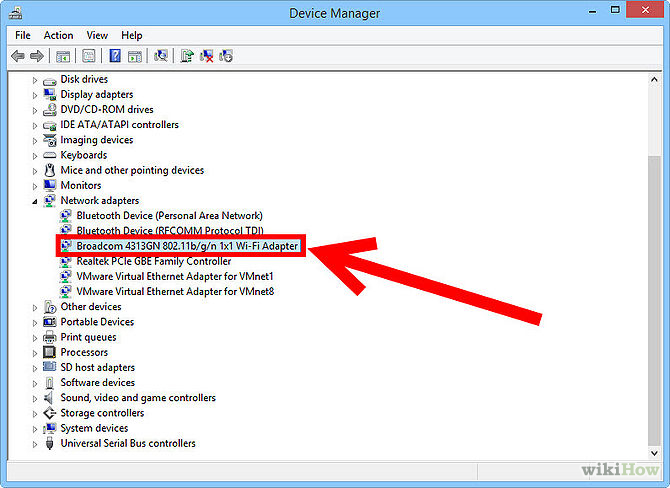
2 Ensure that your computers have wireless networking cards installed. In order to communicate wirelessly with other computers in the network, each computer must have a wireless networking card. If your computers are only a few years old, you are almost guaranteed to already have one built-in, as this is a standard feature on all computers being produced today. If you have an older computer, you may need to purchase and install a networking card.

3 Set up an Internet connection. While LANs can be set up simply to share files between computers without Internet connectivity, there is little benefit to doing so considering the cost of wiring the entire network. To share an Internet connection between computers, you will first need a broadband Internet connection (such as cable or DSL) set up for your primary computer. Contact a local Internet service provider (ISP) to establish a connection if you don’t already have one.

4 Purchase a wireless router. You will need to broadcast your Internet connection wirelessly, and for this, you need a router. When buying a router, make sure you get one that is designed for your connection type (cable, DSL, etc.). You should also consider the strength of the router’s signal. The packaging will describe how far you can expect the router’s signal to broadcast. It will need to reach every computer in your network.

5 Install the router. To install the router, run your main Ethernet cable (the one used for connecting your primary computer to the Internet) from your modem into the router. Plug the router’s power cord in, and then install any software that it came with on each computer in the network. When you are finished, the router should begin broadcasting your Internet connection wirelessly.
6 Connect each computer to the wireless network. On each computer, find the wireless network’s name that you assigned during the software installation. Connect to that network using the password that you created.

7 Share files over the network. To make files on 1 computer accessible to users on other computers, you must mark them as shared. In Windows, you can do this by placing the files in the “Shared Documents” folder or by right-clicking on each file and checking “Share this file” in the “Properties” menu. The process will differ slightly for other operating systems.

8 Connect to any devices in the network. To connect to devices such as printers and scanners, these devices will also need to be able to communicate wirelessly (this feature is not nearly as common on printers as on computers). To connect to a device, simply locate the device’s icon on the network drive on each computer. Double-clicking on a printer’s icon, for example, should install the printer and enable it for future use.
SPECIFIC OUTCOME 3.
Locate components for a local area computer network.
- The location identifies suppliers for LAN components, which fulfil user requirements.
- The location ensures that the LAN components meet user requirements.
3.1 Locate components for a local area computer network
Required Components of a LAN
A Local Area Networks connects computers together to exchange data. Apart from the computers, and other devices like printers and faxes, a LAN has to have six essential components to function.
Network Adapter
A computer needs a network adapter to connect to a network. It converts computer data into electronic signals. It listens for silence on the network cable and applies the data to it when it has an opportunity. The network access element of its job is called Media Access Control, or MAC. The physical address of every computer on a network is called its MAC address. The MAC address is the network adapter’s serial number. Most computers are shipped with the network adapter integrated into the motherboard. However, early PCs didn’t include this function and computer owners had to buy it separately and fit it into an expansion slot on the motherboard. These were called “network cards” because they were sold on a separate card. Although network adapters are now integrated, the name network card is still used. The wireless equivalent is called a Wireless Network Interface Controller.
Network Medium
Wired networks need cable. The most common form of cable used in networks is called the “Unshielded Twisted Pair.” In PC shops, it is generally just referred to as “network cable” or “Ethernet cable.” Ethernet is the most widely implemented set of standards for the physical properties of networks. UTP is so closely identified with Ethernet that it is often given that name. Other cable types used for networks are twin-axial, Shielded Twisted Pair and single-mode and multi-mode fiber optic cable. Wireless networks don’t need cable; they send data on radio waves generated by the WNIC.
Cable Connectors
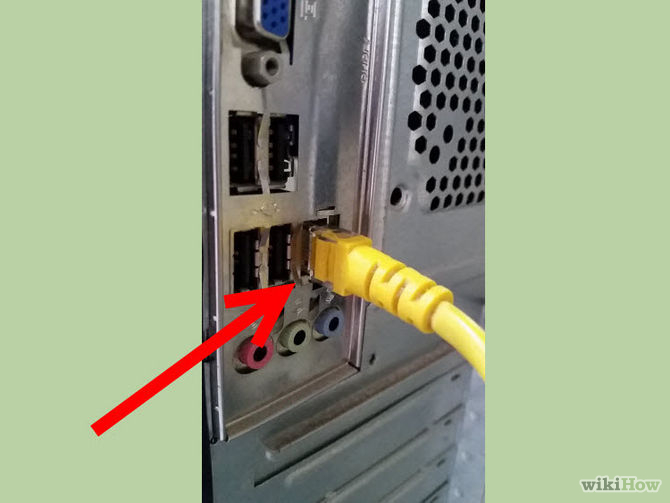
In wired networks, the most common form of connector is the RJ45. Every computer with networking capabilities has an RJ45 port. This is sometimes called a “network port” or an “Ethernet port.” The RJ45 plug looks like a slightly larger telephone plug and connects the Unshielded Twisted Pair or the Shielded Twisted Pair cable.
Power Supply
Both wired and wireless networks need a power supply. A wireless network uses the current to generate radio waves. A cabled network sends data interpreted as an electronic pulse.
Hub/Switch/Router
In wired networks, one computer cannot connect to many others without some form of splitter. A hub is little more than a splitter. It repeats any signals coming into one of its ports out onto all its other ports. A cable leads from each port to one computer. A switch is a more sophisticated version of a hub. It only sends the signal on to the computer with the address written in the arriving message. Routers are much more complicated and are able to forward messages all over the world. Larger networks sometimes use routers for their LAN traffic. The wireless networking device is called a “wireless router.”
Network Software
Software on a communicating computer packages data into segments and puts that data into a structure called a “packet.” The source and destination addresses of the packet are written into the header of the packet. The receiving computer needs to interpret these packets back into meaningful data and deliver it to the appropriate application.
Buying from commodity specialists
A real-life example of a commodity product in a LAN application is a fiber-optic cable assembly, which connects the termination equipment with the cabled portion of the network. It has a connector on one end and a bare fiber on the other end that is typically spliced, either mechanically or through fusion, to the fiber-optic cable. Generally, network operators purchase cable assemblies from a manufacturer, which installs the connector on the cable and polishes it so that a high-quality connection is possible. Network operators occasionally field-terminate the cable, but this process takes time and the results usually are not as consistent as those achieved through factory terminations. Compare this situation to purchasing plastic knives, as opposed to carving the knives out of wood just before you eat. You can do it, but there are some compelling reasons to purchase from suppliers that specialize in producing specific components.
Network operators expect purchased fiber-optic cable assemblies to have certain attributes. For example, it is reasonable to assume the termination process has been carried out in an environment designed to achieve successful results, and that properly trained technicians carry out the process. Purchasers may also expect that certain tests have been performed on the assembly to ensure it meets industry standards. Other expectations may exist regarding such attributes as the quality of the components used in the assembly and how the assembly has been handled to avoid damage. Additionally, network operators usually assume a manufacturer has a good understanding of the required processes necessary to meet the applications of a LAN environment. But these remain assumptions until they are documented.
SPECIFIC OUTCOME 4.
Produce a proposal for a local area computer network.
- The production explains the scope and objectives of the network.
- The production allows the user to judge whether their requirements will be met.
- The production allows implementation time and costs to be estimated.
- The production identifies costs, benefits and assumptions for alternative solutions so that a choice may be made.
4.1 Produce a proposal for a local area computer network.
IT project proposal preparation
The 2 main types of internal it project proposal for replacing systems, such as a CRM system are:
- outline proposal for system selection (and system replacement in principle) – to obtain approval for limited funds to undertake the system selection process
- detailed proposal to implement a replacement system – carried out at the end of the system selection process – to obtain approval for much larger funds to purchase software, hardware, consultancy, training and implement the chosen system
If your organisation has a defined internal project approval process or framework, you will have to closely follow it if you wish to obtain project approval. If there is no defined process, you will have greater choice as to what and how to include in a proposal. But this probably makes it harder, so consider the following points when preparing your IT project proposal: Understand what your key project drivers are eg cost containment, time scale, project quality. Once known, make sure you give this adequate emphasis within the proposal.
Consider the proposal recipients ie the executive management / board, what they are looking for, the information they require and what is important to them and the organisation. Then provide the information they require eg if they want details give them, if not don’t. If you are unsure what they want – find out, before preparing the proposal. Picture them going through your proposal with a checklist – does your proposal tick all the boxes? Plan the proposal before you write it and then stick to the plan. Try to get it right the first time, as rewriting / editing can take up a lot of time.
For each proposal plan item consider the executive’s requirements, their evaluation criteria, emphasis. Purpose of proposal eg to persuade the executive management / board to
- replace the system in principle
- approve and fund the proposed course of action
Put the most important information up front. Say what the project will do for them ie the benefits. Use positive statements. State clearly what actions you want them to do eg review the it project proposal, approve the project, approve funding.
Consider using story boards or annotated outlines to build an outline proposal first and then fill in the detailed information for each story board or heading. Consider preparing the proposal using a single author or a team. It is a lot of work for one person, who needs to have all the required skills. Using multiple authors spreads the workload, but requires careful control, communication, collaboration and proposal editing.
Proposal Checklist – Outline IT project proposal (for system selection plus system replacement in principle)
Summary
Proposed project name
Purpose of proposal
Executive summary
Objectives
Project goals and objectives
Expected outcomes, deliverables and beneficiaries
Project description
Definition of the problem and project background
Proposed solution
Strengths, weaknesses, reliability, scalability, security of the proposed solution
Project scope / parameters
Business area(s) affected eg where the project work will be undertaken, where the benefits will arise
Key project components eg software, hardware, database, network, business process reengineering (BPR) requirements
Conformity to organisational technology strategies and standards
Technical impact of project and compatibility with existing infrastructure
Summarised business and user needs
Sponsor and stakeholder acceptance of the proposal
Benefits
Expected benefits from the project including
- tangible benefits, cost savings or income,
- intangible (soft) benefits
How the project enhances / replaces the existing system, the benefits of a new technology system
Costs
Expected costs for the project. Broken down and analysed: system selection phase, implementation phase, ongoing costs, total budget required, budgetary limits
Business case
Business case justifying the project, based on the expected costs and benefits including ROI, NPV, IRR, Payback calculations
Methodologies
System selection methodology
Outline of how the proposal will be undertaken
Proposed project implementation methodology / technical approach
Project constraints eg system architecture, critical dates
Project plan
Outline project plans – for both system selection and system implementation.
Plans to show key activities, dates, and deliverables
Milestones and measurements / metrics of the outcomes
Time scales
Start and end dates
Interim milestone dates.
Project management
How the project will be managed
How work will be organised / supervised
Communications
Resources
Resources for system selection in some detail, but only in outline for the implementation
Project team, roles, and responsibilities
Resource plan, allocation
Resource details, qualifications, experience, skills
Training requirements
Risks
Risk analysis and management
Assessments
Assessment of existing system(s)
Assessment of alternative proposals, evaluations and why they have been rejected
Implications of doing nothing, why this is not an acceptable option
Assumptions
Assumptions
Proposal Checklist – Detailed IT project proposal (to implement a replacement system)
Essentially a revision and update of the outline it project proposal (above), with more information added
Summary and objectives
Revise as appropriate
Project description
Revise based on knowledge of chosen software / hardware, detailed user requirements and data, software selection process workings, statement of work
Benefits
Revise based on latest workings, analysis of proposed solution
Costs
Revise and tighten up – base on quoted vendor prices eg for software, hardware, maintenance, latest revised estimates for consultancy, training, resources
Business case
Revise based on latest costs and benefits
Methodology
Methodology for system implementation may need revising based on later knowledge and / or the software vendor practices
Project plan
Prepare detailed system implementation plans, even if only include a summary within the proposal
Updated plans to include key activities, tasks, resourcing, gantt charts, dependencies, work schedules
Implementation schedule
Schedule of major milestones, dates with associated deliverables
Stakeholder acceptance of the implementation plan
Time scales and project management
Revise based on latest knowledge
Resources
Revise based on implementation requirements, need for external consultancy, internal staff skills and availability
Risks
Update risk analysis and management
Assumptions
Revise accordingly
Additional details:
- ongoing support requirements
- quality assurance
- vendor contract and service level agreement
LAN (Local Area Network) Proposal,

Network Protocols
- A network protocol is a method used to transport information.
- Each protocol has a certain capacity at which it can transfer information.
- This capacity is usually denoted using Mbps or Kbps
- You can think of a protocol’s capacity to be the cross sectional of a pipe.
- Why would we want greater capacity?
- New applications employing pictures, animations, audio and/or video require greater network capacity.
- The ‘pipe’ is shared.
- ATM is different. Using ATM every user can take advantage of the entire 155 Mbps.
- What protocol is appropriate for the schools needs?
- Plan to use ATM in the future
- Ethernet is the short term solution
- Why not use ATM now?
- It is a new technology and, at this time, it is cost prohibitive to configure every desktop machine for ATM.
The Wire
Like the network protocols, wire has a rated capacity.

The capacity of the wiring must meet or exceed that of the protocol that it will be carry.
- UTP Level 5 meets or exceeds the capacity of all the current protocols.
- AT&Tand Beldin have tested UTP Level 5 at 622 Mbps and 1 Gbps
What about coaxial cable
- EIA/TIA no longer has a standard for co-ax
- EIA/TIA adopted UTP as the standard for copper wiring.
Why not use fiber?
- Fiber does have its advantages
- has a very large capacity
- impervious to EMI and RF interference
- Can cover a greater distance
- The disadvantages of fiber include:
- the fiber is expensive
- the interface cards are expensive
What are the recommendations
- Use UTP Level 5
- use fiber where distance > 90 meters and/or EMI could cause problems
Network Topologies
- There are a number of network topologies

- The star and hierarchical star topologies are the most robust
- Ethernet and ATM over UTP require the star topologies
Hubs and Routers
- What is a hub?
- a hub acts as a multiport repeater
- anything it receives on one port is repeated to all other ports
- the network is analogous to a party line
- What is a router?
- a router acts as a traffic cop. Each message is only broadcast over the network segment that it has permission to travel over.
- Why would you want to use a router?
- A router allows you to segment the network
- this reduces the number of devices on a network segment
- it also reduces collisions
- it protects data traveling over the network
- What are our recommendations?
- Every school should have a router
- the network in the school should be broken down into at least 3 segments (requires 3 hubs)
- one segment would be used for the administration offices
- one segment would be used for the classrooms
- one segment would contain the shared resources for the administration and classroom and also any servers (email, etc.) that will need access to the outside world
- Each lab should have its own hub
- To reduce support costs:
- standardize the hubs and routers throughout both districts
- routers have management software, the hubs should too
Conceptual Diagram
- Based on the recommendations, the conceptual design of a network would be:

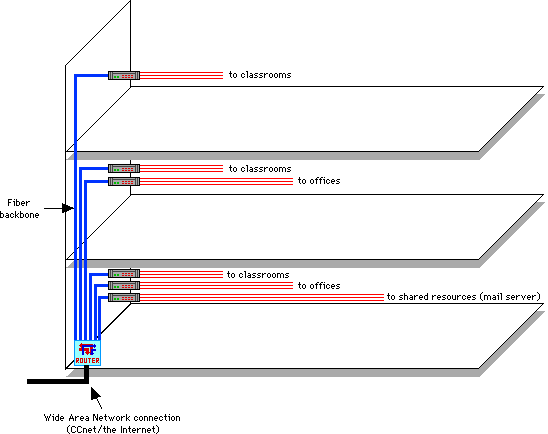
Conceptual Diagram (multi-story building)
- A network for a larger building may look like:
- Note the fiber backbone used for the vertical wiring.
Recommendations
- The Wire
- Adopt EIA/TIA guidelines
- Install UTP Level 5 for horizontal wiring.
- Use fiber for backbone (vertical) wiring.
- Wiring a building
- Hubs and Routers
- Every school should have a router
- The network in the school should be broken down into at least 3 segments (requires 3 hubs)
- one segment would be used for the administration offices
- one segment would be used for the classrooms
- one segment would contain the shared resources for the administration and classroom and also any servers (email, etc.) that will need access to the outside world
- Each lab should have a hub
- To reduce support costs:
- standardize the hubs and routers throughout both districts
- routers have management software, the hubs should too
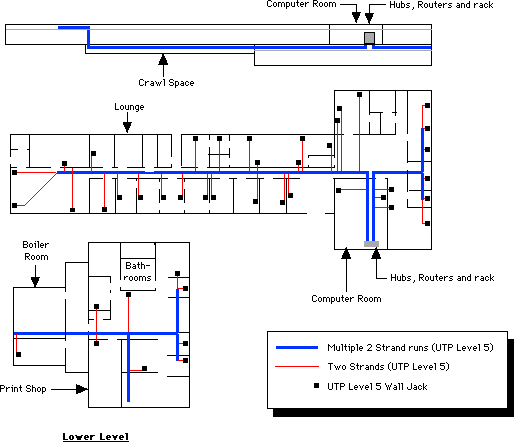
Horizontal Wiring
- General recommendations for horizontal wiring
- Adopt EIA/TIA standards
- Use level 5 hardware – wall jacks, etc.
- Always use cable trays
- Classrooms:
- Minimum 2 drops per room
- 1 drop can be used for Ethernet and the other to support localtalk devices.
- It is better to initially place more drops into a room if it is known that more than 2 devices will be resident in each room. The wire can be left unconnected until such time that it is needed.
- Leal’s technology plan calls for 3 computers in each classroom. Running 4 drops into each classroom would be appropriate.
- If additional jacks are needed, solutions include
- Four or 8 port dumb hubs (ethernet or localtalk)
- Using the cable trays and running additional wire.
- Preferable to have them in same location.
- We felt the front of the room was appropriate.
- Labs
- Two drop minimum
- Will require a hub for each lab
- secure area to house hub. Possible to place the lab’s server in same location.
- Wiring Offices
- Two drops near phone jack
- Meeting Rooms:
- Treated in the same manner as classrooms
- Minimum of 2 drops in each location
- Libraries:
- Treated in the same manner as labs
- The number of computers and peripherals dictate that most libraries have a hub.
EIA/TIA Horizontal Wiring Standards
- A network infrastructure based on the standards developed by the Electronics and Telephone Industry Associations will meet your needs for many years into the future.
- The standards define the maximum length of the cable runs:
- 100 meter maximum between network devices (i.e.. hub and computer)
- No more than 90 meters between wall jack a crossconnect equipment in wiring closet.
- No more than 3 meters from the wall jack to the network device (computer, printer, etc.)
- Is it wise not to follow EIA/TIA standards?
- While ethernet can propagate over a distance greater than 90 meters, installing cable with runs over 90 meters will not allow you to migrate to newer network protocols as they become cost effective.
- Anything installed using the EIA/TIA standards will remain compliant with any new network technologies
- It’s wise to do it right the first time.
- Wiring usually accounts for less than 5
- Studies have shown that wiring, done incorrectly, accounts for nearly 70 all down time.
Example: Mellon Building
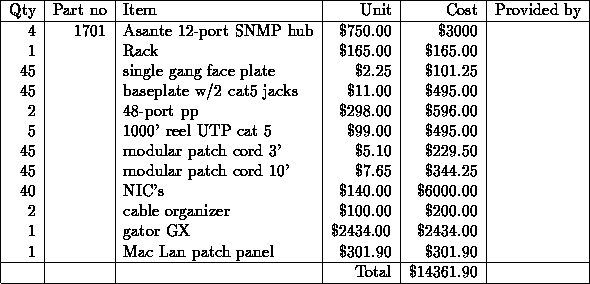
Mellon Building Cost Estimate (excluding router)